netcomm-gps
Shell Script which saves the GPS data to a CSV file in Micro SD card for NetComm Wireless NTC-140 and NTC-140W routers
Download
v1.0 source code and PDF instructions
About and Execute Script
Download, extract and move the script file (cgps.template) to /etc/cdcs/conf/mgr_templates directory of the router and give it executable permissions by running chmod +x cgps.template command. The script should create a gps.csv file in your Micro SD card located at /var/mnt/SDDisk0P1/ directory of the router with GPS data.
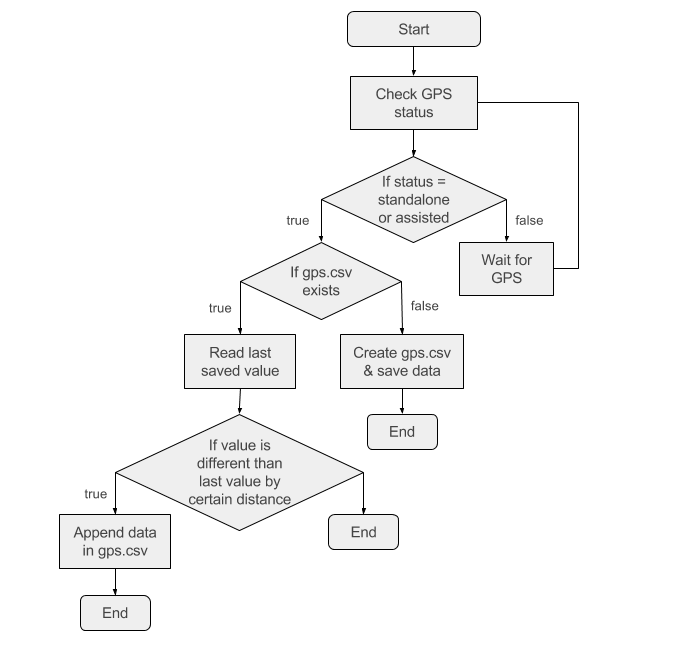
After file is created new data is only saved, if the last saved GPS coordinates are different than new ones by certain distance (in this release - 5 metres).
Flow of Script
Script saves the GPS latitude and longitude coordinates in the file if the coordinates differ by certain distance (in this example 5 meters). Flow chart is attached below:
What does the gps.csv file contain?
Sample gps.csv output is attached below:
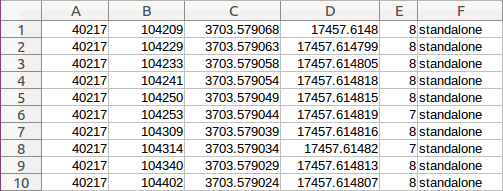
Each column represents following data:
| Column | Description |
|---|---|
| A | Date formatted in day/month/year |
| B | Time formatted in hour/minute/second |
| C | Latitude Coordinates |
| D | Longitude Coordinates |
| E | Number of satellites used to gather the data |
| F | Source of GPS data. Possible values are standalone or agps (assisted GPS) |